Docker for Developers
Docker is an engine that runs containers. As a tool, containers allow you to solve many challenges created in the growing DevOps trend.
What is Docker ?
Docker Container is a standardized unit which can be created on the fly to deploy a particular application or environment. It could be an Ubuntu container, CentOs container, etc. to full-fill the requirement from an operating system point of view. Also, it could be an application oriented container like CakePHP container or a Tomcat-Ubuntu container etc.
Solves Dependency Conflicts
Without containers, the dependencies and files are all placed together on a server. Since managing these dependencies is time-consuming, similar apps are typically grouped on the same server, sharing their dependencies:
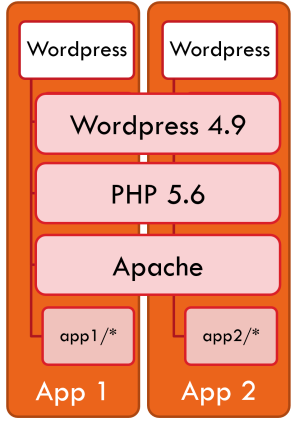
Containers solve this problem since each app will run inside its own container with its own dependencies.
FROM debian:8
CMD ["echo", "Hello world"]
Your typical server would look like:
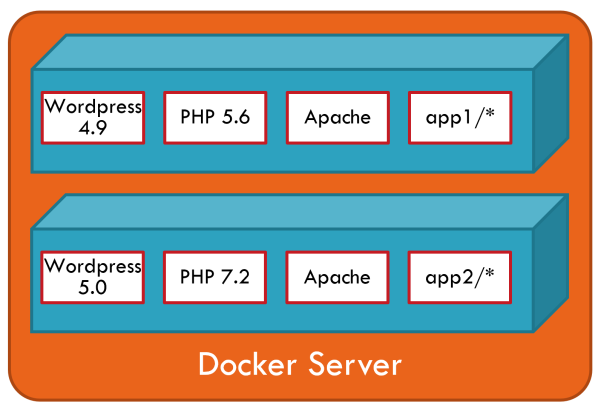
Each container encapsulates its own dependencies. Which means you can migrate the PHP runtime from version 5.6 to 7.2 in a container without it affecting others. Any other container that would use, for instance, Node.JS would not interfere with any of the Wordpress containers.
Containers
A container is what we eventually want to run and host in Docker. You can think of it as an isolated machine, or a virtual machine if you prefer.
Images
Any container that runs is created from an image. An image describes everything that is needed to create a container; it is a template for containers. You may create as many containers as needed from a single image.
Registries
Images are stored in a registry.
Use Docker Images
docker run hello-world
docker ps: lists the containers that are still running. Add the -a switch in order to see containers that have stopped
docker logs: retrieves the logs of a container, even when it has stopped
docker inspect: gets detailed information about a running or stopped container
docker stop: deletes a container that is still running
docker rm: deletes a container
docker container prune -f: This is the equivalent of running one docker rm command for each stopped container.
docker run -d -p 8085:80 nginx: The -p switch takes two parameters; the incoming port you want to open on the host machine, and the port to which it should be mapped inside the container
Using Volumes
docker run -v /your/dir:/data/db -d mongo
It will ensure that any data written to the /data/db directory inside the container is actually written to the /your/dir directory on the host system. This ensures that the data is not lost when the container is restarted.
Creating a Simple Image
The Dockerfile file can have any name. Naming it Dockerfile makes it easier for others to understand its purpose when they see that file in your project. It also means we don’t need to state the file name when using the docker build command.
FROM debian:8
CMD ["echo", "Hello world"]
docker build -t hello .
Reference: